
a:Drake Plus6.08 - Get APK
You'll be able to download in few seconds.
Publisher Description


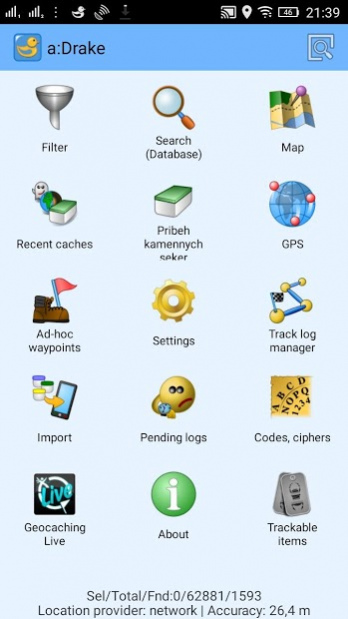
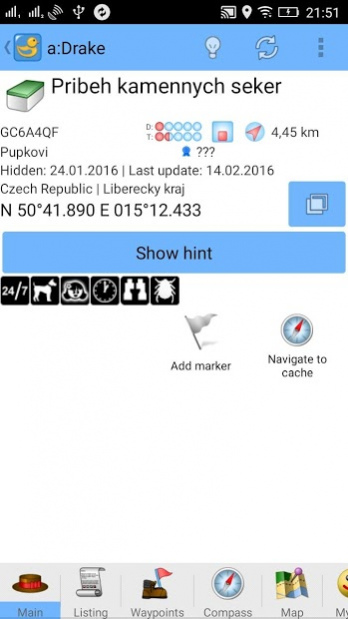
PLUS features:
* trackables
* better track manager
* upload more images to a log
a:Drake is an application designed for paperless geocaching without internet connection. The aim of the program is to provide in one place everything needed for geocaching as well as to allow simple data management through programs on the PC. It is recommended to use a:Drake in cooperation with GeoGet (http://geoget.ararat.cz/doku.php/en:start), because both applications share the same database.
If you like c:geo, don't try this app, becouse it works different way ;)
Main features:
* can work with huge cache database (30 000+)
* all information - listing, attributes, logs, waypoints
* field notes, sending to the web site
* compass
* maps from various sources - automatic download, off-line database storage (MobAC and Locus compatible)
a:Drake is designed for off-line work, ie. without internet connection, however it is also able to download data using Geocaching Live (better for Premium Members, since they don't have any significant limit). Basic Member have number of restrictions defined by Groundspeak side, please refer to http://adrake.cz/doku.php?id=en:user:faq:web
Please note, this version DOES NOT REMOVE restrictions for Basic Member, since they are defined and checked by Groundspeak.
About a:Drake Plus
The company that develops a:Drake Plus is LudekV. The latest version released by its developer is 6.08.
To install a:Drake Plus on your Android device, just click the green Continue To App button above to start the installation process. The app is listed on our website since 2021-01-02 and was downloaded 0 times. We have already checked if the download link is safe, however for your own protection we recommend that you scan the downloaded app with your antivirus. Your antivirus may detect the a:Drake Plus as malware as malware if the download link to cz.adrake.plus is broken.
How to install a:Drake Plus on your Android device:
- Click on the Continue To App button on our website. This will redirect you to Google Play.
- Once the a:Drake Plus is shown in the Google Play listing of your Android device, you can start its download and installation. Tap on the Install button located below the search bar and to the right of the app icon.
- A pop-up window with the permissions required by a:Drake Plus will be shown. Click on Accept to continue the process.
- a:Drake Plus will be downloaded onto your device, displaying a progress. Once the download completes, the installation will start and you'll get a notification after the installation is finished.
Program Details
System requirements
Download information
Pricing
Version History
version 6.08
posted on 2021-01-02
Minor fixes and improvements
version 6.07
posted on 2020-09-22
* Upgrade of libraries to Android 10 (SDK 29) - required by Google
* Mapsforge 0.14
version 6.06
posted on 2019-10-31
Adjust to Android 9 according to Google's request
version 6.05
posted on 2019-10-24
Rollback
version 6.04
posted on 2019-10-23
Just update to Android 9 per Google's request, no real change in the app.
version 6.03
posted on 2019-06-16
Fix of new API data processing
version 5.17.1
posted on 2018-03-21
* New map engine
- Fix of keeping last position and zoom
- Optimalization of rendering (label as text instead of bitmap)
- Adjust of reading of caches
* Option to center map to reference point
version 5.12
posted on 2016-09-02
- Mapsforge 0.6.1,- Recursive evaluation of formula, for example [[A+B]C[D+E]+26],- Calculated variables, for example X = A+B+C,- Automatic marking of visited waypoints,- Visualization of visited waypoints in list,- Settings – new page for waypoints,- Test of map availability corrected,- Fix of the dark theme,- Refresh of MTP after field notes export
version 4.00
posted on 2013-06-30
Several fixes and updates
Disclaimer
External Download
We do not host a:Drake Plus on our servers. We did not scan it for viruses, adware, spyware or other type of malware. This app is hosted by Galad and passed their terms and conditions to be listed there. We recommend caution when installing it.
The APK Download link for a:Drake Plus is provided to you by apps112.com without any warranties, representations or guarantees of any kind, so access it at your own risk.
If you have questions regarding this particular app contact the publisher directly. For questions about the functionalities of apps112.com contact us.
